Write Markdown.
Think less. Ship faster.
A focused desktop Markdown editor with split-pane preview, built-in AI editing across multiple providers, and full version history. No subscriptions, no cloud accounts — everything runs privately on your machine.
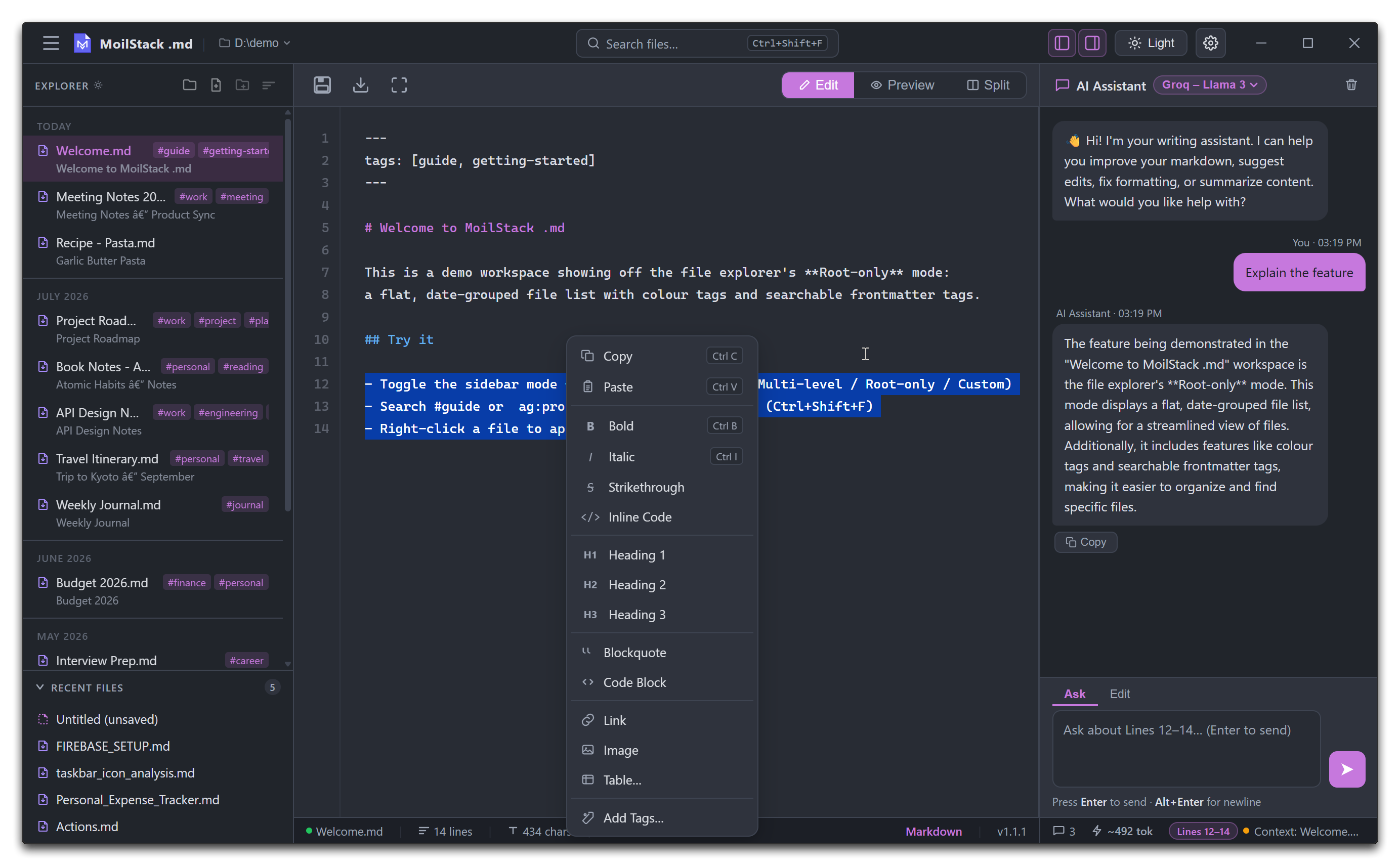
Everything you need.
Nothing you don't.
Built for writers and developers who want a fast, focused Markdown experience without plugin ecosystems or configuration overhead.
Edit, Split & Focus Modes
Cycle Edit → Split → Preview with Ctrl+`. Split view scrolls both panes in sync, and Focus mode hides the sidebars for distraction-free writing.
Inline AI Editing, Any Provider
Ask the AI to rewrite, shorten, expand, or explain sections — changes apply directly to your document and are always reversible with Ctrl+Z. Connect Groq, OpenAI, Mistral, or Together AI, or run models fully offline with local Ollama.
Version History
Every save — manual, autosave, or AI edit — is snapshotted automatically. Right-click a file to browse and restore any prior version.
Search, Tags & Labels
Global search finds filenames and in-file content instantly with Ctrl+Shift+F; find & replace within a file with Ctrl+F. Colour-tag files for quick visual navigation, or add searchable frontmatter tags and filter with #tag or tag:name.
Visual Table Builder
Insert and edit Markdown tables with a point-and-click grid editor — no manual pipe syntax required.
Fully Local & Private
No accounts, no cloud sync, no telemetry. Your files and API keys never leave your machine.
Explorer
Browse, create, rename, and open .md files from any folder, with Multi-level (drag-and-drop file tree), Root-only, and Custom (no-folder) sidebar modes.
Export to PDF
One-click export to a beautifully formatted PDF with A4 margins and clean, readable typography. Share without friction.
Dark & Light Theme
Switch between dark and light mode anytime. Your preference is persisted across sessions automatically.
Multiple Instances
Open as many windows as you need — each runs independently. Work across different files or projects side by side.
Bring your own AI — any model, any provider.
Connect any OpenAI-compatible API or run models locally with Ollama. No vendor lock-in. Switch models from the settings panel in seconds — your API key stays on your machine.
Ready to try it?
Free and open source. No account required. Available for Windows, Linux, and macOS.